

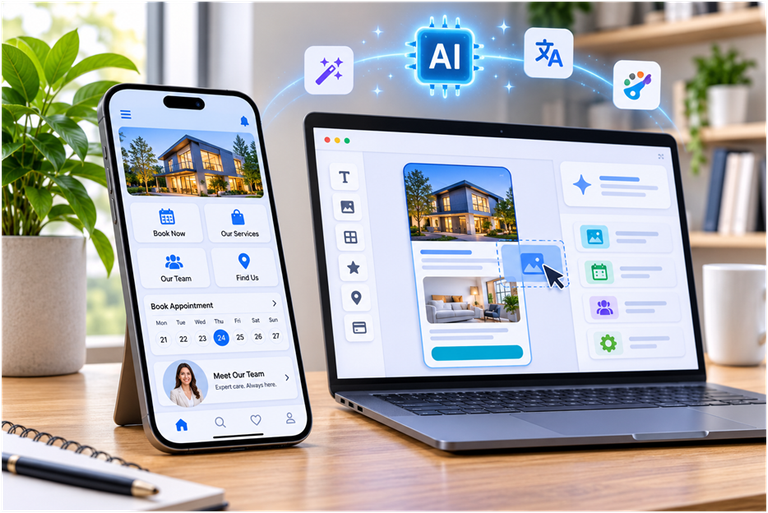
The way businesses connect with customers is changing rapidly. From independent professionals and local service providers to growing startups, companies increasingly need mobile applications that make their services easier to access. However, traditional application development can involve expensive developers, complicated programming languages and lengthy production schedules. Modern platforms are changing this situation by making ai powered app developm more accessible to people without technical backgrounds. Through artificial intelligence and no-code technology, businesses can create mobile applications, organize essential services and develop more convenient digital experiences without building everything from scratch.
Why Mobile Applications Matter for Modern Businesses
A business website remains an important part of an online presence, but it does not always provide the most convenient experience for returning customers. People frequently use smartphones to find services, compare options, arrange appointments and communicate with companies. A dedicated mobile application can bring these activities together in one accessible location.
Consider a beauty salon that receives appointment requests through telephone calls, social media messages and its website. Managing different communication channels can become difficult, especially when several employees handle customer requests. A mobile application can provide a central place where customers explore treatments, view available specialists and arrange appointments.
The same principle applies to fitness trainers, educational institutions, healthcare providers, travel companies and independent professionals. Instead of relying entirely on separate communication channels, businesses can create a digital environment designed around their customers’ needs.
Mobile applications can also strengthen customer relationships. Customers may return to an application to check service information, read announcements, review promotions or manage their appointments. This creates additional opportunities for businesses to maintain communication beyond an individual purchase or booking.
However, developing an application should not automatically mean investing in an expensive custom software project. The most practical solution depends on the business model, available resources and functionality required.
Understanding AI-Powered No-Code App Development
No-code development allows people to create applications using visual interfaces, ready-made components and configurable features instead of writing programming code manually.
Traditional development usually requires specialists who understand programming languages, databases, interface design and software infrastructure. No-code platforms simplify many of these processes by providing tools that users can configure themselves.
Artificial intelligence adds another layer of convenience. Depending on the platform, AI can assist with writing content, generating images, improving descriptions, checking grammar and translating information. These capabilities reduce repetitive tasks and help business owners prepare application content more efficiently.
It is important to understand that AI assistance and application development are related but different activities. AI-generated descriptions do not automatically guarantee a complete, professionally tested application. Users still need to select appropriate functionality, organize information, review the design and test the final experience.
This combination of visual development and AI assistance makes the process more approachable. Someone who understands their business requirements but has never written software can begin creating a useful digital product without first learning a programming language.
How YourModule Makes Application Creation More Accessible
Choosing an appropriate development platform is an important decision because the available tools influence both the creation process and the final application.
YourModule provides a no-code mobile application builder designed for individuals, entrepreneurs and businesses that want to develop applications without traditional programming.
The platform offers ready-made templates for different business categories, including beauty services, healthcare, education, tourism, fitness, commercial services and other professional activities.
Rather than beginning with an entirely empty interface, users can select a suitable template and customize it according to their requirements.
The general process involves six main stages:
1. Choose a template: Select a starting design that reflects the intended business or service.
2. Name the application: Give the application a recognizable name that represents the business.
3. Select a database: Choose an appropriate data-storage option for the application.
4. Enable features: Activate the functionality needed to serve customers.
5. Test the application: Review the design and functionality before publication.
6. Publish: Prepare the application for distribution through supported mobile application stores.
The Role of Artificial Intelligence in Building Better Apps
Artificial intelligence has become increasingly useful in everyday business operations. Its value is not limited to sophisticated automation systems or large technology companies. Small businesses can also use AI to complete routine tasks more efficiently.
Within YourModule, AI-supported functionality can assist with several content-related activities.
Generating Product Names and Descriptions
Writing descriptions for products and services can take considerable time. A business may need descriptions for dozens of treatments, training packages, professional services or promotional offers.
AI can help generate initial wording based on the information provided by the user. Business owners can then review the suggestions, correct details and adjust the language to match their brand.
For example, a fitness trainer could use AI assistance to prepare descriptions for personal training sessions, nutrition consultations and different exercise programmes.
Creating Images and Visual Content
Visual presentation plays an important role in mobile applications. Images help customers understand services, recognize products and develop an impression of a business.
AI-supported image generation can help users prepare visual materials without immediately hiring a graphic designer for every content requirement.
However, businesses should review generated images carefully. Visuals should accurately represent the products or services being offered and should not create misleading expectations.
Improving Grammar and Written Communication
Spelling mistakes and unclear descriptions can make an application appear unprofessional. Grammar-checking assistance can help identify writing problems before content is published.
This is particularly useful for small businesses that do not have dedicated marketing or editorial teams.
Supporting Multiple Languages
Businesses serving customers from different linguistic backgrounds may benefit from translation tools. AI-assisted translation can provide an initial version of application content in another language.
Important business information should still be reviewed by a competent speaker, particularly where legal, medical or financial terminology is involved.
Together, these capabilities can reduce the time required to prepare an application and help business owners maintain more consistent communication.
Essential Features That Make a Business App Useful
A successful application should solve a genuine customer problem. Adding numerous features simply because they are available can make navigation complicated and reduce the overall quality of the experience.
Businesses should identify the most important customer activities before deciding which functions to activate.
Appointment Booking
Booking functionality is especially valuable for service-based businesses.
A salon, therapist, fitness instructor or consultant can use appointment features to organize customer reservations. Depending on the configuration, customers may be able to select services, choose specialists and find available appointment times.
This can reduce unnecessary telephone conversations and make appointment management more convenient.
Service Listings
A service catalogue gives customers an organized overview of available options.
Businesses can include descriptions, prices, relevant images and other information that helps people make informed decisions.
For example, a beauty salon might separate hair treatments, skincare services and manicure packages into different categories.
Employee and Team Profiles
Customers often want to know who will provide a particular service.
Team profiles can introduce employees, explain their experience and display relevant professional information. This can help establish trust before a customer makes an appointment.
Payment Functionality
Payment integration can make transactions more convenient by allowing supported payment methods to be incorporated into the application.
YourModule’s published information lists payment integrations including LiqPay and WayForPay. Businesses should verify current payment availability, supported countries and account requirements before selecting a payment setup.
Maps and Location Information
Location features help customers identify where a business operates.
A company with a physical office, salon, clinic or training centre can provide location information so customers can find the premises more easily.
News and Promotional Updates
Businesses frequently introduce seasonal offers, new services and special announcements.
A dedicated news and promotions section provides a central place to communicate these updates. Supported notification functionality can also help businesses share relevant information with application users.
Blogs and Educational Content
A blog can provide additional value beyond direct sales.
For example, a fitness professional could publish exercise advice, while a travel company might share destination guides. Useful content can strengthen customer relationships and encourage people to return.
Which Industries Can Benefit from No-Code Mobile Apps?
No-code application development is particularly attractive to businesses that need straightforward customer-facing functionality rather than highly specialized software.
Beauty and personal care: Salons, barbershops, skincare specialists and independent beauty professionals can use applications to present services, introduce employees and manage appointments.
Fitness and wellness: Personal trainers and fitness studios can organize information about training packages, schedules and available services.
Education: Tutors, language schools and educational centres can share course information, announcements, schedules and learning resources.
Healthcare services: Suitable service providers may use applications to display general information, introduce professionals and organize appointment requests. Healthcare businesses must separately consider privacy, security and applicable regulatory requirements when handling patient information.
Tourism and travel: Travel businesses can provide destination information, service descriptions, contact details and location resources.
Professional services: Consultants, coaches, freelancers and independent specialists can use applications to present their expertise and provide customers with convenient ways to communicate.
Retail and commercial services: Businesses can organize product information, promotional announcements and customer communication through a dedicated mobile interface.
The most important consideration is not the industry itself. It is whether an application can make an existing customer journey easier.
Customization: Creating an Application That Represents Your Brand
An application should feel like an extension of the business rather than a disconnected digital product.
Brand consistency involves more than placing a company logo on the opening screen. Colors, typography, images, navigation and written communication should work together to create a recognizable identity.
YourModule allows users to customize elements such as application names, colors and content while working with its available templates and components.
Before finalizing a design, businesses should consider several questions. Does the opening screen clearly explain what the business offers? Can customers locate the main service without searching through multiple menus? Are prices and descriptions easy to read? Does the design remain understandable on different smartphone screens?
These questions matter because an attractive application is not necessarily an effective one.
A complicated interface may discourage customers even when the business provides excellent services. Simple navigation and clear information should therefore take priority over unnecessary decorative elements.
Native Mobile Applications and the Customer Experience
Another important consideration is the difference between a mobile-friendly website and a native mobile application.
A mobile website runs through a browser. A native application is designed specifically for a mobile operating system and can provide access to supported device capabilities.
YourModule describes its applications as native apps for iOS and Android. Its published feature information also highlights offline capabilities, access to certain device features and distribution through the Apple App Store and Google Play.
These capabilities can be useful for businesses that want customers to access selected information even when an internet connection is unavailable.
However, offline functionality should not be confused with every online feature working without connectivity. Activities such as processing payments, synchronizing new information or accessing online services may still require an internet connection.
The distinction is important when planning the application experience.
Businesses should identify which information customers may need offline and which activities require a connected service. This makes it easier to set realistic expectations and select appropriate functionality.
How to Plan Your First Business Application
Before opening an application builder, spend time understanding what the application should accomplish.
A clear plan prevents businesses from spending time configuring features that do not contribute to their objectives.
Start by identifying one primary problem.
For a salon, the main objective might be reducing the time spent managing appointments. For a tutor, it could be making course information and schedules easier to access. For a consultant, it might involve providing clients with a convenient location for service information and communication.
Next, identify the people who will use the application. Their expectations should influence the design, language and functionality.
A customer who wants to book an appointment may not need access to complicated menus. A student using an educational application may prioritize schedules, announcements and learning materials.
Once the main purpose is established, create a list of essential features.
It is generally better to launch with a smaller collection of useful functions than to introduce every available option immediately.
After selecting a template, prepare the content. Use clear service descriptions, accurate prices, relevant images and current contact information.
Then test the application with people who have not participated in its creation. Their feedback can reveal confusing navigation, missing information and other problems that the development team may overlook.
Finally, review the publishing requirements for the intended app stores. Creating an application and successfully publishing it are separate stages, and store approval is subject to the relevant platform policies.
Testing Before Launch: A Step Businesses Should Never Skip
An application that looks impressive during development may still contain problems that affect real customers.
Testing helps identify these issues before the product becomes publicly available.
Start by checking every major navigation option. Open each section and confirm that the information is accurate and displayed correctly.
Test appointment functionality from beginning to end. If customers can select services and available times, confirm that the process behaves as expected.
Where payment functionality is enabled, verify the complete payment experience using appropriate testing procedures. Make sure customers receive clear confirmation and understand what happens after a transaction.
Also review the application on different screen sizes and supported devices.
Ask several people to complete common activities without providing instructions. If they struggle to find a service, understand a description or complete a booking, the interface may need improvement.
YourModule provides a preview and testing process that allows users to examine their applications before publication. Its platform information also describes real-time changes, helping users review modifications without requiring customers to reinstall the application for every content adjustment.
Regular testing should continue after launch. Customer expectations change, businesses introduce new services and technical requirements can evolve over time.
Costs, Time and Practical Considerations
Budget is one of the main reasons businesses explore no-code development.
Traditional custom development can involve several separate expenses, including design, programming, testing, infrastructure and ongoing maintenance.
A no-code platform can reduce the amount of specialist development work required, particularly for applications built around standard business functions.
However, no-code does not mean completely cost-free.
Businesses should consider subscription fees, additional AI credits where applicable, app store developer accounts, payment processing charges and any other services required for publication and operation.
YourModule advertises a three-day free trial, while its subscription and feature arrangements are explained through its pricing and FAQ pages. Users should review the latest terms before making a financial commitment.
Time requirements also depend on the complexity of the application.
A straightforward service application may be prepared relatively quickly using an existing template. A more detailed project involving extensive content, several locations, complex booking arrangements or additional testing will naturally require more preparation.
It is sensible to begin with a realistic first version and expand it after understanding how customers use the application.
Common Mistakes to Avoid When Creating a Mobile App
Even with accessible development tools, businesses can make mistakes that reduce the value of their applications.
One common mistake is adding too many features. A large number of options can make an application difficult to navigate. Focus on the functions that directly support customer needs.
Another mistake is using incomplete information. Missing prices, outdated opening hours and unclear service descriptions can damage customer confidence.
Some businesses also underestimate the importance of visual consistency. Inconsistent colors, unrelated images and poorly organized text can make an application appear unfinished.
Ignoring testing is another serious problem. Every major function should be checked before the application is released.
Finally, businesses should avoid assuming that launching an application automatically produces customers. An application needs to be promoted through existing marketing channels, websites, social media and direct customer communication.
Its performance should be evaluated using meaningful indicators such as bookings, repeat visits, customer engagement and completed transactions.
The Future of Accessible Mobile App Development
The development industry continues to move toward tools that make digital creation available to a wider audience.
Artificial intelligence is contributing to this change by helping people complete content-related activities, generate visual materials and reduce repetitive work.
No-code platforms are also becoming more relevant because businesses increasingly want control over their digital operations without maintaining large technical teams.
This does not mean professional developers will become unnecessary. Complex systems, specialized integrations, advanced security requirements and highly customized products may still require experienced software engineers.
Instead, accessible development platforms provide another option for projects that can be built using established templates and standard business functionality.
For entrepreneurs and smaller companies, this can make experimentation more practical. They can develop an initial application, collect feedback and improve it without immediately committing to a large custom software project.
Platforms such as YourModule illustrate how visual application building and AI-assisted content tools can work together to simplify this process.
Conclusion
Mobile applications can help businesses improve customer communication, organize services and create more convenient digital experiences. Until recently, developing one often required technical knowledge, specialist developers and substantial financial resources.
AI-assisted no-code development is making the process more accessible. With templates, configurable features, content-generation assistance and testing tools, businesses can take a more active role in creating their own mobile applications.
YourModule provides an option for entrepreneurs, service providers and small businesses looking to explore this approach. Its combination of visual application building and AI-supported content tools can help simplify several stages of the development process.
The best starting point is a clearly defined business objective. Identify what customers need, choose only the essential features, prepare accurate content and test the experience before publication. With a thoughtful approach, a mobile application can become a useful part of a business’s long-term digital strategy.
