

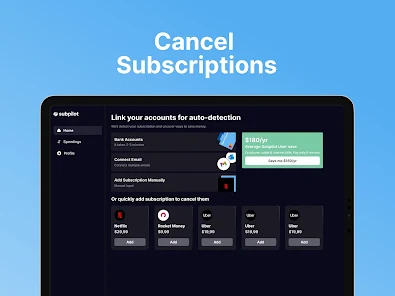
Subpilot gives users clear routes for managing their own subscription, with instructions for direct purchases, App Store purchases and Google Play purchases. That makes it easy to choose the right billing controls and keep a clear confirmation of the result.
The process begins with your purchase record and ends with a visible subscription status. Official guidance explains each route, while the Support Center is available when you want help identifying the right account or purchase platform.
This guide walks through the process in a few simple steps so you can manage your Subpilot access with confidence.
Start with the subscription you want to manage
The goal is straightforward: stop renewal for your own Subpilot plan. Keep the relevant receipt nearby so you can identify the purchase route, account and plan associated with your access.
This is also a useful moment to distinguish your Subpilot plan from external subscriptions you may manage inside the app. Your own plan uses Subpilot’s billing controls or the app-store controls associated with the purchase.
With the receipt and account identified, the rest of the process becomes a clear sequence of account actions.
Published cancellation routes
The official Subpilot cancellation guide describes starting from **Profile**, opening the settings icon and choosing **Manage Subscription**.
For a direct web or card purchase, the guide says this leads to the web app, where the user chooses **Cancel my subscription** and confirms.
For App Store or Google Play purchases, it describes opening the relevant native subscription controls and cancelling Subpilot there.
Purchase route: Where to manage it, Direct purchase, Subpilot account and web billing controls associated with the receipt.
App Store: Apple subscription controls for the purchasing account.
Google Play: Google Play subscription controls for the purchasing account.
Unclear route: Purchase record and official Subpilot support.
The guide describes access continuing through the current paid period and provides on-screen and email confirmation. That gives users a clear view of both the cancellation result and the remainder of their access.
Customers appreciate Subpilot’s general ease of use
“Pretty easy!” Carolyn · 4/5 · Invited · Displayed date 21 October 2026
[Original Trustpilot review](https://www.trustpilot.com/reviews/6ad8eda99c07834451124ba0).
Carolyn’s comment contributes a positive view of Subpilot’s broader usability. It reflects the approachable style that also makes published account instructions easy to follow.
For subscription management, the goal is equally simple: choose the intended plan, follow the purchase-specific route and keep the resulting confirmation.
Another positive usability comment
“Easy to use!” Albert Scalzo · 4/5 · Invited · Displayed date 21 October 2026
[Original Trustpilot review](https://www.trustpilot.com/reviews/6ad8ccdab01a1526a0cd34fc).
Albert adds another favourable perspective on the product’s usability. These comments help create a reassuring context for users exploring Subpilot’s account controls.
The official guide then supplies the specific steps for managing a plan, combining an approachable product experience with a defined administrative process.
Review the plan before confirming
Before the final action, check the plan name and any displayed access-end date. This confirms that the screen relates to your own Subpilot purchase and shows what will happen to access.
If the interface offers plan changes or other alternatives, choose the option that matches your intended result. The cancellation flow will then present the relevant confirmation step.
Once complete, keep the on-screen or email confirmation with your purchase record. It creates a simple, reliable reference for the future.
Create a useful subscription record
A compact record can include:
- plan name;
- purchase route;
- cancellation date;
- confirmation reference;
- expected end of access; and
- receipt reference.
This gives you everything needed to understand the status at a glance. It also keeps your Subpilot plan organised alongside the other recurring services in your personal records.
If you use a broader subscription inventory, update its status to reflect the confirmed result and the paid-through date.
Find the right account with official support
If the subscription is not visible in the account you first open, the receipt provides a helpful guide. Compare the purchase email, app-store account and transaction details with the account currently displayed.
The [Subpilot Support Center](https://support.subpilot.tech/en/support/home) offers a dedicated place to ask for help identifying the route. Include the purchase date, amount and non-sensitive receipt details, and explain that you want to manage Subpilot’s own plan.
That clear scope helps support focus on the right billing relationship and provide purchase-specific guidance.
Account deletion is a separate option
Subpilot also publishes an [account deletion guide](https://support.subpilot.tech/en/support/solutions/articles/73000671525-how-to-delete-my-account-) for users who want that separate account outcome.
Subscription cancellation controls manage renewal, while the deletion process handles the account itself under its own steps and waiting period. Keeping those options distinct makes it easy to choose exactly the result you want.
If you plan both actions, complete each through its published route and retain the confirmations you want for your records.
Review any later transaction with clear records
If you want support to review a later transaction, your cancellation record provides an excellent starting point. Include the plan, confirmation date, transaction date and the outcome you would like investigated.
This keeps the conversation focused and makes it easy to identify whether the payment relates to the same plan, another purchase or a charge that was already pending.
The Support Center gives that review a clear official home alongside your previous request details.
A simple support message framework
A helpful message can say:
- you want renewal for your Subpilot plan stopped or its current status confirmed;
- where and when you purchased;
- which account or receipt reference is involved;
- whether you have already received confirmation;
- what current status you would like support to explain.
This concise structure makes the request easy to understand and gives you a useful reply to keep with your account records.
Frequently asked questions
Where do I cancel a direct Subpilot purchase?
The official guide describes starting from Profile, opening settings, choosing Manage Subscription and using the web billing controls to cancel and confirm.
Where do I cancel an App Store or Google Play purchase?
Use the native subscription controls for the store account associated with the purchase, following Subpilot’s current guide.
Will access continue after cancellation?
The published guide describes access continuing through the current paid period. Your confirmation shows the relevant access details.
What should I keep after cancelling?
Keep the on-screen or email confirmation, plan name, purchase route and expected end of access.
Where can I get help finding the right subscription?
Use the official Support Center and provide the purchase date and non-sensitive receipt details.
Bottom line
Subpilot provides clear, purchase-specific routes for managing a subscription, supported by official instructions and confirmation records. Direct, App Store and Google Play purchases each have an identifiable path.
With the receipt, the correct billing controls and a saved confirmation, managing your Subpilot plan becomes a simple and well-organised account task.
